Predictive Analytics with TensorFlow in Python: An End-to-End Guide
Predictive analytics focuses on using historical data, statistical methods, and machine learning models to predict future outcomes such as sales trends, customer churn, demand patterns, risk scores, and time-series behavior.
This guide explores predictive analytics with TensorFlow in Python, covering both foundational concepts and practical implementation. You will learn why TensorFlow is widely used for scalable predictive modeling, the main types of prediction problems, and the complete predictive analytics workflow, from data preparation and model design to training, evaluation, and deployment.
The article then moves into hands-on model building using the Keras API, real-world prediction examples, and performance tuning techniques for reliable, production-ready results.

Predictive Analytics with TensorFlow
Predictive analytics is the practice of using historical data, statistical techniques, and machine learning models to predict future outcomes. Instead of describing what has already happened, predictive analytics focuses on what is likely to happen next by learning patterns and relationships from data. It is widely applied across domains such as sales forecasting, customer churn prediction, demand estimation, risk scoring, and time-series forecasting, where accurate predictions directly influence decision-making.
At scale, predictive analytics requires models that can capture non-linear relationships, handle large feature spaces, and adapt to complex data distributions. This is where deep learning frameworks, particularly TensorFlow in Python, become central to modern predictive modeling workflows, enabling practitioners to build robust, scalable, and production-ready predictive analytics solutions.
Why TensorFlow Is Widely Used for Predictive Analytics
TensorFlow provides a robust ecosystem for building, training, and deploying predictive models efficiently. It is designed for both experimentation and production, making it suitable for real-world predictive analytics systems.
Key strengths that make TensorFlow effective for predictive analytics include:
High-performance numerical computation optimized for large-scale data processing
Native support for neural networks, regression models, and time-series architectures
Seamless GPU and TPU acceleration for faster model training
Strong integration with NumPy, Pandas, scikit-learn, and production pipelines
In practice, most predictive analytics workflows in TensorFlow rely on the Keras API, which offers a high-level interface for rapid model development while still allowing low-level customization when needed. This balance makes TensorFlow in Python accessible without sacrificing control or performance, enabling developers to build efficient and scalable predictive models with ease.
Common Types of Predictive Analytics Problems
Predictive analytics problems generally fall into a few well-defined categories, each requiring different modeling strategies and evaluation metrics.
1. Regression-Based Prediction
Regression models are used when the target variable is continuous, such as revenue, temperature, energy consumption, or stock prices. In TensorFlow, regression problems are commonly solved using fully connected neural networks optimized with loss functions like Mean Squared Error (MSE) or Mean Absolute Error (MAE).
2. Classification-Based Prediction
Classification focuses on predicting categorical outcomes, such as customer churn, fraud detection, or lead conversion. These models output class probabilities and are trained using loss functions like Binary Crossentropy or Categorical Crossentropy, depending on the number of classes.
3. Time-Series Forecasting
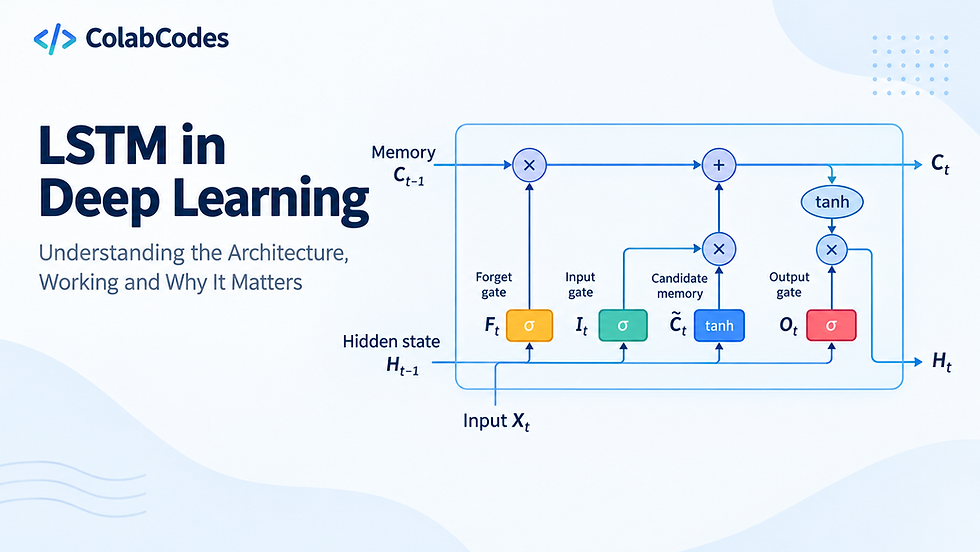
Time-series forecasting deals with sequential data where temporal dependencies matter. TensorFlow supports sequence models such as LSTM and GRU networks, which are widely used for forecasting sales, demand, sensor readings, and financial trends over time.
4 Multivariate Predictive Modeling
Many real-world predictive analytics tasks involve multiple input features influencing a single outcome. Deep neural networks in TensorFlow are well-suited for multivariate prediction, as they can learn complex feature interactions without manual feature engineering.
Together, these problem types define the foundation of predictive analytics workflows implemented with TensorFlow, setting the stage for model design, training, evaluation, and deployment in later sections.
Building a Predictive Model Using TensorFlow in Python (Hands-On)
Building a predictive analytics model with TensorFlow in Python involves more than defining a neural network, it starts with preparing structured data in a way that allows the model to learn meaningful patterns. The process moves step by step from feature normalization to model training, focusing on how input variables are transformed and passed through the network to generate reliable predictions.
The implementation relies on the Keras API, which simplifies model construction while remaining flexible enough for real-world predictive analytics tasks. Important design choices, including network depth, loss function selection, and optimization using Adam, are explained in context. By the end, the resulting model is trained, evaluated with appropriate regression metrics, and structured in a way that reflects how predictive models are commonly built and used in production environments.
1. Environment Setup and Library Imports
Every predictive analytics workflow in TensorFlow begins with a clean and well-defined environment. Importing the right libraries upfront ensures that data handling, numerical computation, and model development work together smoothly. At this stage, the focus is on preparing the foundations required to download data, process it efficiently, and later feed it into a TensorFlow-based predictive model.
import tensorflow as tf
import urllib.request
import zipfile
import os
import pandas as pd
import numpy as np
The code imports TensorFlow as the primary framework for building and training predictive models. Standard Python utilities such as urllib, zipfile, and os are used to download datasets and manage files locally, which keeps the workflow reproducible and self-contained. Pandas and NumPy handle structured data manipulation and numerical operations, both of which are essential for tabular predictive analytics in Python.
2. Data Downloading and Dataset Preparation
Preparing clean and meaningful input data is a critical step in any predictive analytics workflow using TensorFlow. Before a model can learn useful patterns, the raw dataset must be downloaded, standardized, and refined to reduce noise and inconsistencies. This stage focuses on transforming the UCI Energy Efficiency dataset into a structured, model-ready format that supports accurate and stable prediction.
# Download and prepare dataset
ZIP_URL = "https://archive.ics.uci.edu/static/public/242/energy+efficiency.zip"
ZIP_FILE = "energy_efficiency.zip"
XLSX_FILE_IN_ZIP = "ENB2012_data.xlsx"
CSV_FILE = "ENB2012_data.csv"

if not os.path.exists(CSV_FILE):
    if not os.path.exists(ZIP_FILE):
        urllib.request.urlretrieve(ZIP_URL, ZIP_FILE)

    with zipfile.ZipFile(ZIP_FILE, "r") as zip_ref:
        zip_ref.extractall(".")
    os.remove(ZIP_FILE)

    if os.path.exists(XLSX_FILE_IN_ZIP):
        df = pd.read_excel(XLSX_FILE_IN_ZIP)
        df.to_csv(CSV_FILE, index=False)

# Load and preprocess data
df = pd.read_csv(CSV_FILE)

feature_names = [
    'Relative_Compactness', 'Surface_Area', 'Wall_Area', 'Roof_Area',
    'Overall_Height', 'Orientation', 'Glazing_Area', 'Glazing_Area_Distribution',
    'Heating_Load', 'Cooling_Load'
]
df.columns = feature_names

# Remove duplicates
df = df.drop_duplicates()

# Handle outliers using IQR capping
df_clean = df.copy()
for col in df_clean.select_dtypes(include=[np.number]).columns:
    Q1 = df_clean[col].quantile(0.25)
    Q3 = df_clean[col].quantile(0.75)
    IQR = Q3 - Q1
    lower_bound = Q1 - 1.5 * IQR
    upper_bound = Q3 + 1.5 * IQR
    df_clean[col] = np.clip(df_clean[col], lower_bound, upper_bound)

# Feature engineering
df_clean['Surface_to_Volume'] = df_clean['Surface_Area'] / (df_clean['Overall_Height'] * 100)
df_clean['Wall_to_Roof_Ratio'] = df_clean['Wall_Area'] / df_clean['Roof_Area']

# Save preprocessed data
df_clean.to_csv("ENB2012_preprocessed.csv", index=False)

# Print clean dataset info
print("="*60)
print("PREPROCESSED DATASET")
print("="*60)
print(f"\nShape: {df_clean.shape}")
print(f"\nColumns: {list(df_clean.columns)}")
print(f"\nMissing values: {df_clean.isnull().sum().sum()}")
print("\n" + "="*60)

Output:
============================================================
PREPROCESSED DATASET
============================================================

Shape: (768, 12)

Columns: ['Relative_Compactness', 'Surface_Area', 'Wall_Area', 'Roof_Area', 'Overall_Height', 'Orientation', 'Glazing_Area', 'Glazing_Area_Distribution', 'Heating_Load', 'Cooling_Load', 'Surface_to_Volume', 'Wall_to_Roof_Ratio']

Missing values: 0

============================================================
The code downloads the dataset directly from the UCI repository, extracts the Excel file, and converts it into a CSV for easier reuse. After loading the data, clear feature names are assigned, duplicate records are removed, and numerical outliers are handled using IQR-based capping to limit extreme values. A small amount of feature engineering is also applied to introduce ratio-based features that better capture structural relationships in the data. The final cleaned dataset is saved locally, making it ready to be fed into a TensorFlow predictive model in the next steps of the pipeline.
3. Building the TensorFlow Data Pipeline
A well-structured data pipeline is essential for predictive analytics with TensorFlow in Python, as it ensures that data flows efficiently from raw input to model training. Properly batching, shuffling, and normalizing the data improves convergence during training and helps the model generalize to unseen examples. By keeping the pipeline in TensorFlow, the workflow remains scalable, reproducible, and fully compatible with end-to-end predictive modeling.
# Model configuration
NUM_FEATURES = 8
LABEL_INDEX = 8
BATCH_SIZE = 32
CSV_COLUMNS = 10
DEFAULTS = [[0.0]] * CSV_COLUMNS

def parse_csv(line):
    fields = tf.io.decode_csv(line, record_defaults=DEFAULTS)
    features = tf.stack(fields[:NUM_FEATURES])
    label = fields[LABEL_INDEX]
    return features, label

# Build dataset pipeline
dataset = (
    tf.data.TextLineDataset(CSV_FILE)
    .skip(1)
    .map(parse_csv)
    .shuffle(768)
)

train_size = int(0.8 * 768)
train_ds = dataset.take(train_size).batch(BATCH_SIZE)
test_ds = dataset.skip(train_size).batch(BATCH_SIZE)

# Normalization
normalizer = tf.keras.layers.Normalization()
normalizer.adapt(train_ds.map(lambda x, y: x))
The code first defines key dataset parameters, including the number of features, label column index, batch size, and default values for CSV parsing. The parse_csv function converts each line of the CSV into a TensorFlow tensor, separating features from the target label. Using tf.data.TextLineDataset, the dataset is loaded efficiently, skipping the header, mapping the parsing function, and shuffling records to prevent ordering bias during training. The dataset is then split into training and testing subsets and batched for model input.
Finally, a TensorFlow Normalization layer is adapted to the training features, ensuring that each input variable is scaled appropriately, which improves stability and performance when feeding data into the predictive model.
4. Defining and Compiling the Predictive Model
At the core of predictive analytics with TensorFlow is the model architecture itself, which determines how input features are transformed into predictions. For structured, tabular data, a fully connected neural network is a practical choice because it can learn non-linear relationships between multiple input variables. The goal at this stage is to design a model that is expressive enough to capture meaningful patterns while remaining stable and generalizable.
# Build model
model = tf.keras.Sequential([
    normalizer,
    tf.keras.layers.Dense(64, activation="relu"),
    tf.keras.layers.Dropout(0.2),
    tf.keras.layers.Dense(32, activation="relu"),
    tf.keras.layers.Dropout(0.2),
    tf.keras.layers.Dense(1)
])

# Compile
model.compile(
    optimizer=tf.keras.optimizers.Adam(0.001),
    loss="mse",
    metrics=["mae", "mse"]
)
The code defines a Keras Sequential model that begins with the previously adapted normalization layer, ensuring all inputs are scaled consistently during training and inference. This is followed by two dense layers with ReLU activation, which allow the model to learn complex feature interactions. Dropout layers are included to reduce overfitting by randomly deactivating neurons during training. The final dense layer outputs a single value, making the model suitable for regression-based predictive analytics. During compilation, the Adam optimizer is selected for efficient gradient-based optimization, while mean squared error is used as the loss function. Tracking both MAE and MSE provides clear insight into prediction accuracy throughout TensorFlow model training.
5. Training the Predictive Analytics Model
Training is where the TensorFlow predictive model begins learning patterns from historical data. During this phase, the model iteratively adjusts its weights to minimize prediction error, using the training dataset while continuously validating performance on unseen data. Monitoring validation performance is especially important in predictive analytics, as it helps ensure the model generalizes well rather than memorizing the training data.
early_stop = tf.keras.callbacks.EarlyStopping(
    monitor='val_loss',
    patience=10,
    restore_best_weights=True
)
# Train
history = model.fit(
    train_ds,
    validation_data=test_ds,
    epochs=100,
    verbose=1,
    callbacks=[early_stop]
)
The code trains the model using the fit method, passing in the prepared training and validation datasets. An EarlyStopping callback is used to watch the validation loss and halt training when improvements stop, preventing unnecessary epochs and reducing the risk of overfitting.
6. Model Validation, Prediction, and Training Visualization
Evaluating model performance is a critical step in predictive analytics with TensorFlow, as it reveals how well the trained model performs on unseen data. Rather than relying only on training metrics, evaluation on a separate test dataset provides a more realistic view of predictive accuracy. Metrics such as Mean Absolute Error (MAE) and Root Mean Squared Error (RMSE) are commonly used in regression-based predictive analytics because they quantify prediction error in the same units as the target variable, making results easier to interpret.
from matplotlib import pyplot as plt

# Evaluate
loss, mae, mse = model.evaluate(test_ds, verbose=0)

print(f"Test MAE: {mae:.3f}")
print(f"Test RMSE: {np.sqrt(mse):.3f}")

# Predict
sample = tf.constant([[0.98, 514.5, 294.0, 110.25, 7.0, 2.0, 0.0, 0.0]])
prediction = model.predict(sample, verbose=0)
print(f"\nSample Prediction: {prediction[0][0]:.2f}")
print("="*60)

# Plot training history
plt.figure(figsize=(14, 5))
plt.subplot(1, 2, 1)
plt.plot(history.history['loss'], label='Training Loss')
plt.plot(history.history['val_loss'], label='Validation Loss')
plt.xlabel('Epoch')
plt.ylabel('Loss (MSE)')
plt.title('Model Loss')
plt.legend()
plt.grid(True)

Outputs:
Test MAE: 2.116
Test RMSE: 3.014
The code evaluates the trained model using TensorFlow’s evaluate method and reports MAE and RMSE for the test dataset. A sample input is then passed to the model to demonstrate how predictions are generated from new data, reinforcing the end goal of predictive modeling. Finally, the training history is visualized by plotting training and validation loss over epochs. This visualization helps identify convergence behavior and detect overfitting by comparing how loss evolves across datasets, offering valuable insight into the stability and reliability of the TensorFlow predictive analytics pipeline.

7. Model Evaluation and Performance Tuning
Model evaluation goes beyond reporting a single metric; it is about building confidence that a model built with TensorFlow in Python will generalize well to real-world data. In supervised learning workflows, validation strategies play a central role. A common approach is the train–validation split used during training, where performance on unseen validation data guides decisions like early stopping. This helps prevent overfitting by halting training once validation loss stops improving. For more robust evaluation, techniques like cross-validation can be applied outside the TensorFlow training loop, especially during exploratory analysis, to better understand how stable the model performance is across different data splits.
1. Hyperparameter Tuning
Once a reliable validation setup is in place, attention shifts to hyperparameter tuning. Neural networks are sensitive to choices such as the number of layers, number of neurons, activation functions, dropout rates, and batch size. Small changes in these parameters can significantly impact convergence speed and final accuracy. In TensorFlow, tuning is often an iterative and experimental process, guided by validation metrics rather than training loss alone. The goal is not to build the largest model, but one that captures meaningful patterns without unnecessary complexity.
Among all hyperparameters, learning rate optimization deserves special attention when training models with TensorFlow in Python. The learning rate controls how quickly model weights are updated during training. A rate that is too high can cause unstable training and divergence, while a rate that is too low can slow convergence and trap the model in suboptimal solutions. Optimizers like Adam help by adapting the learning rate during training, and callbacks such as learning-rate schedulers can further refine this process by reducing the learning rate once progress plateaus.
2. Bias-Variance Tradeoff
Performance tuning is closely tied to the bias–variance tradeoff, a core concept in machine learning. High bias models are too simple and fail to capture underlying relationships, leading to underfitting. High variance models, often seen in deep neural networks, fit training data too closely and struggle to generalize. Techniques like regularization, dropout, early stopping, and proper dataset size help strike a balance. Effective TensorFlow pipelines aim for this balance, ensuring the model is expressive enough to learn patterns while remaining robust on unseen data.
3. Model Interpretability
Finally, model interpretability remains a challenge in deep learning. Unlike linear models or decision trees, neural networks act as black boxes, making it difficult to explain individual predictions. This lack of transparency can be problematic in domains where trust and accountability matter. While techniques like feature importance analysis, SHAP values, and sensitivity analysis can provide partial insights, interpretability often comes at the cost of added complexity. As a result, performance tuning in deep learning with TensorFlow in Python is not only about improving metrics, but also about understanding the tradeoffs between accuracy, complexity, and explainability within a predictive modeling workflow.
Deploying TensorFlow Models to Production
Deploying a TensorFlow model is the step that transforms predictive analytics and machine learning experiments into real-world applications. The right deployment approach depends on factors such as scalability needs, latency requirements, target platforms, and operational complexity. Below are the most effective and widely used ways to deploy TensorFlow models, each suited to different production scenarios.
1. TensorFlow Serving for Scalable Production APIs
TensorFlow Serving is a production-ready solution designed for high-performance model inference. Models are deployed in the SavedModel format and exposed through REST or gRPC endpoints. Built-in support for model versioning, request batching, and low-latency inference makes it a strong choice for large-scale systems such as recommendation engines, predictive analytics platforms, and enterprise web applications.
Optimized for scalable TensorFlow model deployment in production environments
Supports hot-swapping model versions without downtime
Enables high-throughput inference using dynamic batching
Integrates cleanly with Docker, Kubernetes, and cloud-native infrastructure
In practice, TensorFlow Serving fits naturally into modern MLOps workflows where models are trained offline and served at scale. It separates model development from serving infrastructure, allowing teams to iterate on predictive models independently while maintaining stable, reliable inference services. This makes it especially effective for organizations deploying predictive analytics models that must handle high request volumes with consistent performance.
2. Deploying TensorFlow Models as REST APIs
with Flask or FastAPI
Wrapping a TensorFlow model inside a lightweight web framework allows flexible and highly customizable deployment. Flask and FastAPI are commonly used to expose prediction endpoints while embedding business logic, authentication, and validation layers directly into the application. This approach gives developers full control over request handling, preprocessing, and post-processing, making it easier to align model inference with real-world application requirements.
Ideal for custom TensorFlow model deployment with application-specific logic
Simple integration with REST APIs, databases, and external services
Faster development cycles with minimal infrastructure overhead
Well suited for internal tools, MVPs, and startup-scale predictive systems
For many teams, deploying TensorFlow models with Flask or FastAPI strikes a practical balance between flexibility and speed. It enables rapid iteration on predictive analytics models while keeping deployment architecture simple, especially in scenarios where traffic is moderate and operational complexity needs to remain low.
3. Browser-Based Deployment with TensorFlow.js
TensorFlow.js enables models to run directly in the browser using JavaScript, bringing predictive analytics and machine learning inference to the client side. By eliminating the need for backend inference, this approach reduces server load, improves user privacy, and enables real-time, low-latency interactions directly within web applications.
No server-side inference, reducing infrastructure and scaling costs
Enhanced data privacy, since inputs never leave the user’s device
Ideal for interactive dashboards, client-side computer vision, and demos
Performance varies based on browser capabilities and device hardware
Client-side deployment with TensorFlow.js is particularly effective for applications that prioritize responsiveness and user experience. While it may not match server-grade hardware for heavy workloads, it offers a compelling solution for lightweight predictive models, educational tools, and front-end–driven analytics experiences.
4. Mobile and Edge Deployment Using TensorFlow Lite
TensorFlow Lite is optimized for mobile devices, embedded systems, and IoT environments, making it a strong choice for deploying predictive models at the edge. Trained TensorFlow models are converted into a compact format and can be further optimized using techniques such as quantization, pruning, and hardware acceleration to reduce size and improve inference speed.
Designed for low-latency, on-device inference
Supports offline predictions without network dependency
Efficient use of CPU, GPU, and specialized accelerators
Well suited for resource-constrained environments
This deployment approach is particularly effective for applications that require fast responses and reliable performance in limited-connectivity settings. By running models directly on devices, TensorFlow Lite enables real-time predictive analytics while minimizing power consumption and external infrastructure requirements.
5. Cloud Deployment on Managed Machine Learning Platforms
Cloud providers offer managed services for deploying TensorFlow models with built-in scalability, monitoring, and CI/CD integration. Platforms such as Google Cloud, AWS, and Azure handle much of the operational complexity, allowing teams to focus on model development rather than infrastructure management. This approach is especially effective for predictive analytics systems that must adapt to fluctuating workloads.
Automated scaling and load balancing for real-time inference
Integrated monitoring, logging, and model versioning
Native support for CI/CD pipelines and MLOps workflows
Seamless integration with data storage, streaming, and analytics services
Cloud-based deployment is ideal for production environments that demand high availability and reliability. By leveraging managed services, organizations can deploy TensorFlow models quickly, maintain consistent performance under heavy traffic, and connect predictive models directly to enterprise data pipelines with minimal operational overhead.
Conclusion
TensorFlow provides a powerful and flexible foundation for building scalable, production-ready predictive analytics systems. From efficient data pipelines and high-performance numerical computation to robust model training and seamless deployment options, it supports the entire machine learning lifecycle. Its deep integration with TensorFlow in Python - Keras, and modern production tools makes it well suited for handling real-world predictive problems such as regression, classification, and time-series forecasting at scale.
As predictive analytics requirements grow in complexity, TensorFlow also opens the door to more advanced modeling approaches. Exploring deeper architectures such as LSTMs, GRUs, and Transformer-based models can significantly improve forecasting accuracy for sequential and temporal data. Experimenting with these architectures allows practitioners to move beyond traditional models and build intelligent systems capable of capturing long-term patterns and complex dependencies in data.