

Classifying the IMDB Dataset with TensorFlow in Python
Updated: Mar 8
Sentiment analysis is one of the most common tasks in natural language processing (NLP). It involves analyzing text to determine whether the underlying sentiment expressed is positive, negative, or neutral. This technique is widely used in applications such as product review analysis, social media monitoring, customer feedback evaluation, and recommendation systems.
One of the most widely used datasets for sentiment analysis is the IMDB movie review dataset, which contains thousands of movie reviews labeled as either positive or negative. Because of its structured format and balanced categories, it has become a standard benchmark for training and evaluating text classification models.
In this tutorial, we will build a sentiment classification model using TensorFlow in Python to analyze movie reviews from the IMDB dataset. The goal of the model is to learn patterns within the text and automatically classify each review based on its sentiment.

What is the IMDB Dataset in TensorFlow?
The IMDB dataset is one of the most widely used datasets for sentiment analysis in natural language processing. It is included directly in TensorFlow’s Keras API, making it easy for developers and researchers to load and experiment with text classification models. The dataset is specifically designed for binary sentiment classification, where the goal is to determine whether a movie review expresses a positive or negative opinion.
The dataset contains 50,000 movie reviews collected from the Internet Movie Database (IMDB). These reviews are evenly split into two categories, ensuring a balanced dataset for training and evaluation. Half of the reviews express positive sentiment, while the other half express negative sentiment.
The dataset is also divided into two main subsets to support model training and evaluation. The training set contains 25,000 reviews that the model learns from, while the test set contains another 25,000 reviews used to evaluate how well the model performs on unseen data.
The IMDB dataset structure is as follows:
1. Training Set: 25,000 reviews (12,500 positive and 12,500 negative)
2. Test Set: 25,000 reviews (12,500 positive and 12,500 negative)
Because of its balanced structure and clean labeling, the IMDB dataset is commonly used to evaluate sentiment analysis algorithms and compare different machine learning and deep learning approaches for text classification.
Classifying the IMDB dataset with TensorFlow
Classifying the IMDB dataset with TensorFlow involves building a model to predict the sentiment of movie reviews, distinguishing between positive and negative sentiments. The IMDB dataset, which includes 50,000 reviews split equally between positive and negative, is preprocessed into sequences of integers representing words. By leveraging TensorFlow's Keras API, you can efficiently load and prepare this data, apply text preprocessing techniques like padding to standardize input sizes, and construct a deep learning model. Typically, a model for this task includes embedding layers to convert word indices into dense vectors, followed by recurrent layers like LSTMs to capture sequential dependencies in the text. The model is trained on labeled data to learn patterns associated with positive and negative sentiments, and its performance is evaluated on a separate test set to ensure its effectiveness. This approach provides a robust framework for sentiment analysis and demonstrates TensorFlow's capabilities in handling natural language processing tasks.
Step 1: Import Necessary Libraries
The first step in building a sentiment analysis model is importing the required libraries. TensorFlow provides the core deep learning framework, while the Keras API simplifies tasks such as loading datasets, preprocessing text, and building neural network models.
In this example, we will import the IMDB dataset directly from TensorFlow, along with tools for sequence preprocessing and neural network construction. We also import Matplotlib for optional visualization tasks.
import tensorflow as tf
from tensorflow.keras.datasets import imdb
from tensorflow.keras.preprocessing.sequence import pad_sequences
from tensorflow.keras.models import Sequential
from tensorflow.keras.layers import Embedding, LSTM, Dense
from tensorflow.keras.utils import plot_model
import matplotlib.pyplot as plt
These libraries provide everything needed to load the dataset, prepare the input sequences, build the neural network architecture, and visualize results.
Step 2: Load and Prepare the IMDB Dataset
TensorFlow’s Keras API includes a built-in function that allows developers to easily download and load the IMDB movie review dataset. When the dataset is loaded, the movie reviews are already converted into sequences of integers, where each integer represents a specific word in the dataset’s vocabulary.
In this example, we limit the vocabulary to the 10,000 most frequent words. This helps reduce model complexity and improves training efficiency.
# Load the dataset
vocab_size = 10000

# Number of words to use in the dataset
(X_train, y_train), (X_test, y_test) = imdb.load_data(num_words=vocab_size)
Once the dataset is loaded, the next step is to standardize the length of each review. Since movie reviews can vary significantly in length, neural networks require padding so that every input sequence has the same size.
The pad_sequences function ensures that all reviews have a consistent length by either truncating longer reviews or padding shorter ones with zeros.
# Pad sequences to ensure uniform input size
max_length = 500

# Maximum length of each review
X_train = pad_sequences(X_train, maxlen=max_length)
X_test = pad_sequences(X_test, maxlen=max_length)
By setting the maximum review length to 500 words, the model receives consistent input dimensions during training, which is required for neural network processing.
When running this code for the first time, TensorFlow automatically downloads the IMDB dataset:
Downloading data from https://storage.googleapis.com/tensorflow/tf-keras-datasets/imdb.npz17464789/17464789 ━━━━━━━━━━━━━━━━━━━━ 0s 0us/stepAfter the download is complete, the dataset is cached locally so it can be loaded instantly in future runs.
Step 3: Build the Model
After preparing the dataset, the next step is to build the neural network used for sentiment classification. In this example, we use a Sequential model, which allows layers to be stacked in a simple linear architecture.
The model begins with an Embedding layer, which converts integer-encoded words into dense vector representations. This layer helps the model learn semantic relationships between words by mapping them into a continuous vector space.
Next, we add two LSTM (Long Short-Term Memory) layers. LSTMs are a type of recurrent neural network designed to capture long-term dependencies in sequential data such as text. The first LSTM layer returns the full sequence of outputs so that the second LSTM layer can further process the contextual information. The second LSTM layer then produces a condensed representation of the review.
Finally, a Dense output layer with a sigmoid activation function is used to produce a probability score indicating whether the review is positive or negative.
# Model architecture
model = Sequential([
    Embedding(input_dim=vocab_size, output_dim=128,
              input_length=max_length),
    LSTM(128,return_sequences=True),
    LSTM(64),
    Dense(1,activation='sigmoid')])

# Compile the model
model.compile(
    optimizer='adam',
    loss='binary_crossentropy',
    metrics=['accuracy'])
The model is compiled using the Adam optimizer, which is widely used for deep learning tasks due to its efficient training performance. Since this is a binary classification problem, the binary cross-entropy loss function is used to measure prediction error.
Step 4: Train the TensorFlow Model
Once the model architecture is defined, the next step is to train the network using the IMDB training dataset. During training, the model analyzes the review sequences and adjusts its internal weights in order to correctly classify the sentiment of each review.
In this example, the model is trained for 5 epochs, meaning the entire dataset is passed through the network five times. The batch size is set to 64, which determines how many samples are processed before the model updates its parameters.
Additionally, a validation split of 20% is used. This means that a portion of the training data is reserved for validation so the model’s performance can be monitored during training.
# Model training
history = model.fit(
    X_train, y_train,
    epochs=5,
    batch_size=64,
    validation_split=0.2)
As training progresses, TensorFlow displays metrics such as accuracy and loss for both the training and validation datasets. These values help track how well the model is learning and whether it is improving over time.
Epoch 1/5313/313 ━━━━━━━━━━━━━━━━━━━━ 640s 2s/step - accuracy: 0.6977 - loss: 0.5566 - val_accuracy: 0.8504 - val_loss: 0.3753
...
Epoch 5/5313/313 ━━━━━━━━━━━━━━━━━━━━ 649s 2s/step - accuracy: 0.9656 - loss: 0.1066 - val_accuracy: 0.8492 - val_loss: 0.4029
The increasing training accuracy and decreasing loss values indicate that the model is successfully learning patterns in the movie reviews and improving its sentiment predictions.
Step 5: Evaluate the Model
After training the neural network, the next step is to evaluate its performance using the test dataset. The test data contains movie reviews that were not used during training, allowing us to measure how well the model generalizes to new and unseen inputs.
During evaluation, the model calculates the loss value and accuracy score based on its predictions for the test reviews. The loss measures how far the predictions are from the actual labels, while the accuracy indicates the percentage of reviews that were classified correctly.
The evaluation process can be performed using TensorFlow’s evaluate() function:
# Model evaluation
loss, accuracy = model.evaluate(X_test, y_test)
print(f'Test Accuracy: {accuracy:.4f}')
When this code is executed, TensorFlow processes the test dataset and returns the model’s final performance metrics.
782/782 ━━━━━━━━━━━━━━━━━━━━ 278s 355ms/step - accuracy: 0.8457 - loss: 0.4237Test Accuracy: 0.8509The results show that the model achieves a test accuracy of approximately 85%, indicating that it correctly classifies most movie reviews as positive or negative. This demonstrates that the LSTM-based neural network successfully learned meaningful sentiment patterns from the training data and can generalize well to unseen reviews.
Step 6: Visualize the Training History
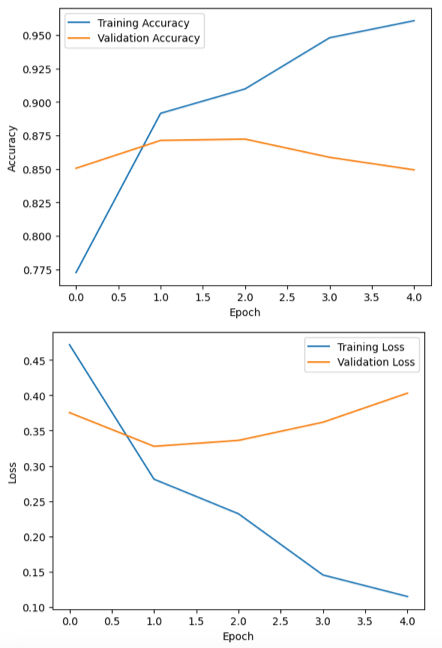
After training the model, it is helpful to visualize how the model performed during the training process. By plotting the training and validation accuracy and loss, we can better understand how the model improved over time and whether it is learning effectively.
These visualizations help identify potential issues such as overfitting or underfitting. For example, if the training accuracy continues to increase while the validation accuracy starts to decrease, it may indicate that the model is memorizing the training data instead of generalizing well to new data.
Using Matplotlib, we can plot the training history stored in the history object returned by the model.fit() function. First, we visualize the training and validation accuracy across epochs.
# Plot model training & validation accuracy
plt.plot(history.history['accuracy'], label='Training Accuracy')
plt.plot(history.history['val_accuracy'], label='Validation Accuracy')
plt.xlabel('Epoch')
plt.ylabel('Accuracy')
plt.legend()plt.show()
Next, we plot the training and validation loss values to observe how the model’s error decreases during training.
# Plot model training & validation loss
plt.plot(history.history['loss'], label='Training Loss')
plt.plot(history.history['val_loss'], label='Validation Loss')
plt.xlabel('Epoch')
lt.ylabel('Loss')
plt.legend()
plt.show()
These graphs provide a clear visual representation of the model’s learning progress and can help guide further improvements to the architecture, training duration, or hyperparameters.
Full Code for Classifying the IMDB dataset with TensorFlow
Here’s the complete code to classify the IMDB dataset with TensorFlow. This example demonstrates loading the dataset, preprocessing the data, building a model with LSTM layers, and evaluating its performance. Run this code to start building a sentiment analysis model from scratch.
import tensorflow as tf
from tensorflow.keras.datasets import imdb
from tensorflow.keras.preprocessing.sequence import pad_sequences
from tensorflow.keras.models import Sequential
from tensorflow.keras.layers import Embedding, LSTM, Dense
from tensorflow.keras.utils import plot_model
import matplotlib.pyplot as plt
# Load the dataset
vocab_size = 10000 # Number of words to use in the dataset
(X_train, y_train), (X_test, y_test) = imdb.load_data(num_words=vocab_size)
# Pad sequences to ensure uniform input size
max_length = 500 # Maximum length of each review
X_train = pad_sequences(X_train, maxlen=max_length)
X_test = pad_sequences(X_test, maxlen=max_length)
# Model architecture
model = Sequential([
Embedding(input_dim=vocab_size, output_dim=128, input_length=max_length),
LSTM(128, return_sequences=True),
LSTM(64),
Dense(1, activation='sigmoid')
])
# Compile the model
model.compile(optimizer='adam', loss='binary_crossentropy', metrics=['accuracy'])
# Model training
history = model.fit(
X_train, y_train,
epochs=5,
batch_size=64,
validation_split=0.2
)
# Model evaluation
loss, accuracy = model.evaluate(X_test, y_test)
print(f'Test Accuracy: {accuracy:.4f}')
# Plot model training & validation accuracy
plt.plot(history.history['accuracy'], label='Training Accuracy')
plt.plot(history.history['val_accuracy'], label='Validation Accuracy')
plt.xlabel('Epoch')
plt.ylabel('Accuracy')
plt.legend()
plt.show()
# Plot model training & validation loss
plt.plot(history.history['loss'], label='Training Loss')
plt.plot(history.history['val_loss'], label='Validation Loss')
plt.xlabel('Epoch')
plt.ylabel('Loss')
plt.legend()
plt.show()
Conclusion
In this tutorial, we walked through how to build a sentiment analysis model using the IMDB movie review dataset with TensorFlow in Python. We started by loading and preparing the dataset, then built a neural network with embedding and LSTM layers to learn patterns in the review text.
After training the model, we evaluated its performance on the test data and visualized the training results to see how the model improved over time. Overall, the model was able to classify movie reviews as positive or negative with good accuracy.
This project shows how TensorFlow can be used to build practical deep learning models for text classification and is a great starting point for exploring more advanced natural language processing tasks.


