

Analyzing Diabetes Dataset with Python
Diabetes is one of the most prevalent chronic diseases worldwide, affecting millions of people and posing significant challenges to healthcare systems. Early detection and risk assessment are crucial for preventing complications and improving patient outcomes. As healthcare continues to embrace data-driven approaches, machine learning has emerged as a powerful tool for identifying patterns in medical data and supporting predictive diagnosis.
In this tutorial, we'll explore the Diabetes Dataset, a widely used benchmark dataset in machine learning that contains various medical and demographic attributes associated with diabetes risk. Using Python and popular data science libraries such as Pandas, NumPy, Scikit-learn, Matplotlib, and Seaborn, we'll perform data exploration, preprocessing, model building, and evaluation. By the end of this guide, you'll have a practical understanding of how machine learning can be applied to healthcare data to predict diabetes and uncover the factors that contribute most to disease risk.

What is Diabetes Dataset with Python
The Diabetes Dataset, commonly known as the Pima Indians Diabetes Dataset, is one of the most widely used datasets in machine learning and healthcare analytics. It contains medical information collected from 768 female patients of Pima Indian heritage and is primarily used to build predictive models that determine the likelihood of a person having diabetes.
This dataset is particularly popular among beginners and researchers because it provides a real-world healthcare classification problem. The objective is to use various medical and demographic attributes to predict the target variable, Outcome, which indicates the presence or absence of diabetes.
The dataset includes the following predictor variables:
Pregnancies – Number of times the patient has been pregnant.
Glucose – Plasma glucose concentration after a glucose tolerance test.
BloodPressure – Diastolic blood pressure measured in mm Hg.
SkinThickness – Triceps skinfold thickness measured in millimeters.
Insulin – Two-hour serum insulin level measured in mu U/ml.
BMI – Body Mass Index, calculated as weight divided by height squared.
DiabetesPedigreeFunction – A function that estimates the likelihood of diabetes based on family history.
Age – Age of the patient in years.
Outcome – Indicates the diabetes status of the patient: 0 – Non-diabetic, 1 – Diabetic.
The Diabetes Dataset serves as an excellent benchmark for classification algorithms and data analysis techniques. It is frequently used for:
Data preprocessing and cleaning exercises
Exploratory Data Analysis (EDA)
Feature engineering
Binary classification tasks
Model evaluation and comparison
Healthcare and medical prediction projects
Using Python libraries such as NumPy, Pandas, Matplotlib, Seaborn, and Scikit-learn, data scientists can explore the dataset, visualize relationships between features, and build machine learning models to predict diabetes risk with high accuracy.
Loading Diabetes Dataset in Pandas
Before building any machine learning model, the first step is to load the dataset into Python for exploration and analysis. In this example, we'll use the Pandas library, one of the most popular tools for data manipulation and analysis.
The Pima Indians Diabetes Dataset is available online as a CSV file, making it easy to load directly into a Pandas DataFrame. After loading the data, we'll assign meaningful column names and display the first few records to understand its structure.
import pandas as pd

# Load the dataset
df = pd.read_csv(
'https://raw.githubusercontent.com/jbrownlee/Datasets/master/pima-indians-diabetes.data.csv', header=None)

# Assign column names
df.columns = [
    "Pregnancies",
    "Glucose",
    "BloodPressure",
    "SkinThickness",
    "Insulin",
    "BMI",
    "DiabetesPedigreeFunction",
    "Age",
    "Outcome"
]

# Display the first few rows
print(df.head())

Output:

   Pregnancies  Glucose  BloodPressure  SkinThickness  Insulin   BMI  \
0            6      148             72             35        0  33.6
1            1       85             66             29        0  26.6
2            8      183             64              0        0  23.3
3            1       89             66             23       94  28.1
4            0      137             40             35      168  43.1

   DiabetesPedigreeFunction  Age  Outcome
0                     0.627   50        1
1                     0.351   31        0
2                     0.672   32        1
3                     0.167   21        0
4                     2.288   33        1
Data Exploration and Visualization
Before training a machine learning model, it is important to explore and understand the dataset. Data exploration helps identify patterns, detect anomalies, uncover relationships between variables, and determine if any preprocessing steps are required. One of the easiest ways to begin exploring a dataset is by examining its descriptive statistics.
Descriptive statistics provide a summary of the dataset by calculating measures such as the mean, standard deviation, minimum value, maximum value, and quartiles. These statistics help us understand the distribution of each feature and identify unusual values that may require further investigation.
Pandas offers the convenient .describe() method, which generates these statistics for all numerical columns in a DataFrame.
import seaborn as sns
import matplotlib.pyplot as plt

# Summary statistics
print(df.describe())

Output:

       Pregnancies     Glucose  BloodPressure  SkinThickness     Insulin  \
count   768.000000  768.000000     768.000000     768.000000  768.000000
mean      3.845052  120.894531      69.105469      20.536458   79.799479
std       3.369578   31.972618      19.355807      15.952218  115.244002
min       0.000000    0.000000       0.000000       0.000000    0.000000
25%       1.000000   99.000000      62.000000       0.000000    0.000000
50%       3.000000  117.000000      72.000000      23.000000   30.500000
75%       6.000000  140.250000      80.000000      32.000000  127.250000
max      17.000000  199.000000     122.000000      99.000000  846.000000

              BMI  DiabetesPedigreeFunction         Age     Outcome
count  768.000000                768.000000  768.000000  768.000000
mean    31.992578                  0.471876   33.240885    0.348958
std      7.884160                  0.331329   11.760232    0.476951
min      0.000000                  0.078000   21.000000    0.000000
25%     27.300000                  0.243750   24.000000    0.000000
50%     32.000000                  0.372500   29.000000    0.000000
75%     36.600000                  0.626250   41.000000    1.000000
max     67.100000                  2.420000   81.000000    1.000000
Pairplot in Seaborn
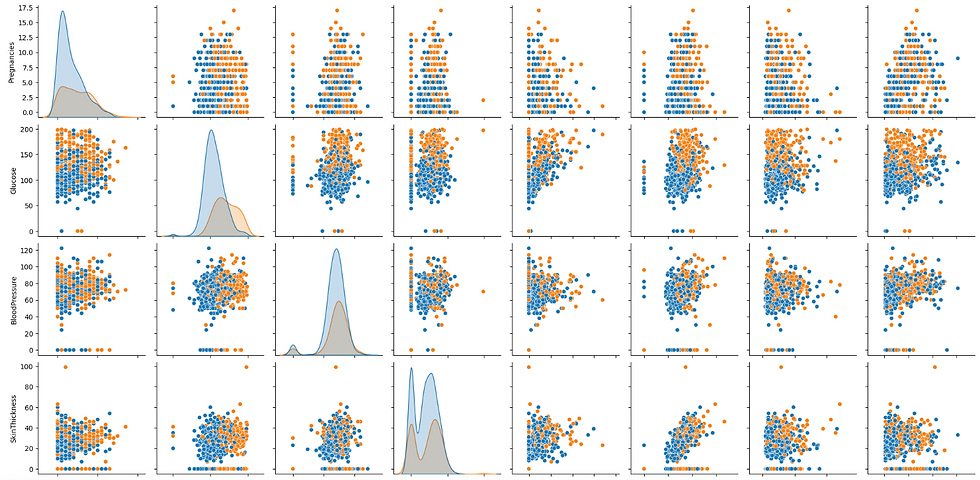
A pairplot in Seaborn is a powerful visualization tool that creates a grid of scatter plots for each pair of features in a dataset, along with histograms for each feature. It helps in visualizing the relationships and distributions between multiple variables, making it easy to detect patterns, correlations, and potential outliers. Additionally, pairplots can include different hues to distinguish between categorical outcomes, providing deeper insights into data separation based on classes.
# Pairplot to visualize relationships
sns.pairplot(df, hue='Outcome')
plt.show()
Output of the above code:
Correlation heatmap in seaborn
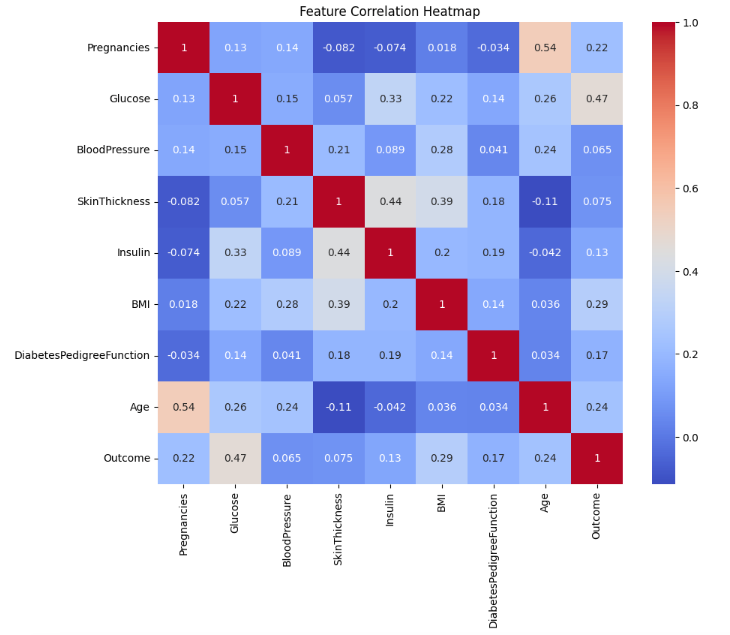
A correlation heatmap in Seaborn is a visual representation of the correlation matrix of numerical features in a dataset. It uses color gradients to indicate the strength and direction of relationships between variables, with darker or lighter shades showing stronger correlations. This tool helps quickly identify highly correlated features, which can be useful for feature selection and understanding the data's structure.
# Correlation heatmap
plt.figure(figsize=(10, 8))
sns.heatmap(df.corr(), annot=True, cmap='coolwarm')
plt.title('Feature Correlation Heatmap')
plt.show()
Output of the above code:
Preprocessing Diabetes Dataset
Raw datasets often contain missing values, inconsistent data, and features with different scales. Before training a machine learning model, it is essential to preprocess the data so that the model can learn meaningful patterns more effectively.
In the Pima Indians Diabetes Dataset, several medical attributes contain zero values that are not physiologically possible. For example, a glucose level, blood pressure, or BMI of zero cannot occur in a living patient. These zeros are generally treated as missing values and must be handled before model training.
First, import the required libraries that will be used for preprocessing, data splitting, and feature scaling.
from sklearn.model_selection import train_test_split
from sklearn.preprocessing import StandardScaler
import numpy as np
Next, identify the columns that contain unrealistic zero values and replace those values with NaN so they can be treated as missing data.
columns_to_replace = [
    "Glucose",
    "BloodPressure",
    "SkinThickness",
    "Insulin",
    "BMI"]df[columns_to_replace] = df[columns_to_replace].replace(0, np.nan)
After converting invalid values into missing values, fill them using the mean value of each respective column.
df.fillna(df.mean(), inplace=True)Now separate the predictor variables from the target variable. The features will be stored in X, while the diabetes outcome will be stored in y.
X = df.drop('Outcome', axis=1)y = df['Outcome']The dataset is then divided into training and testing sets. The training data is used to train the model, while the testing data is reserved for evaluating its performance on unseen data.
X_train, X_test, y_train, y_test = train_test_split(
    X,
    y,
    test_size=0.2,
    random_state=42)
Finally, standardize the feature values so that all variables have a similar scale. This is particularly important for algorithms that are sensitive to feature magnitudes.
scaler = StandardScaler()
X_train = scaler.fit_transform(X_train)
X_test = scaler.transform(X_test)
With these preprocessing steps completed, the dataset is now clean, properly structured, and ready for machine learning model training and evaluation.
Building a Classification Model – Logistic Regression
Now that the dataset has been cleaned and preprocessed, we can build a machine learning model to predict if a patient has diabetes. For this task, we'll use Logistic Regression, one of the most widely used algorithms for binary classification problems.
Logistic Regression predicts the probability that a data point belongs to a particular class. In this case, it determines the likelihood of a patient being diabetic (1) or non-diabetic (0) based on the input features.
First, import the Logistic Regression model and the evaluation metrics that will be used later to assess model performance.
from sklearn.linear_model import LogisticRegression
from sklearn.metrics import classification_report, accuracy_score
Next, create an instance of the Logistic Regression model and train it using the training data.
model = LogisticRegression(random_state=42)
model.fit(X_train, y_train)
Once the model has been trained, use it to make predictions on the testing dataset.
y_pred = model.predict(X_test)At this stage, the Logistic Regression model has learned patterns from the training data and generated predictions for the unseen test data. In the next step, we'll evaluate the model's performance using metrics such as accuracy, precision, recall, and the classification report.
If you are interested in learning how Logistic Regression is implemented without Scikit-learn and learning how Logistic Regression is implemented without Scikit-learn. Check out our step-by-step tutorial covering the sigmoid function, log loss, gradient descent optimization, and a full NumPy-based implementation from scratch. Logistic Regression from Scratch with Python
Model Evaluation in sklearn
After training a machine learning model, it is important to evaluate how well it performs on unseen data. Scikit-learn provides several evaluation metrics that help measure the effectiveness of a classification model.
The classification_report() function generates a detailed summary containing precision, recall, F1-score, and support for each class. These metrics provide a more complete picture of model performance than accuracy alone.
First, calculate the model's accuracy on the test dataset.
# Evaluate the model
accuracy = accuracy_score(y_test, y_pred)
print(f'Accuracy: {accuracy * 100:.2f}%')
Next, generate a classification report to view detailed performance metrics for each class.
# Classification report
print(classification_report(y_test, y_pred))

Output:
Accuracy: 75.32%
              precision    recall  f1-score   support
   0              0.80      0.83      0.81        99
   1              0.67      0.62      0.64        55
accuracy                              0.75       154
macro avg         0.73      0.72      0.73       154
weighted avg      0.75      0.75      0.75       154
The model achieves an accuracy of approximately 75.32%, meaning it correctly predicts the diabetes status of about three-quarters of the patients in the test set.
For patients without diabetes (Class 0), the model achieves strong precision and recall scores, indicating that it performs well when identifying non-diabetic cases. For diabetic patients (Class 1), the scores are slightly lower, suggesting that some positive cases are missed or incorrectly classified.
The precision metric measures how many of the predicted positive cases were actually positive. Recall indicates how many of the actual positive cases were correctly identified by the model. The F1-score combines precision and recall into a single metric, making it useful when evaluating classification performance. Finally, support shows the number of samples belonging to each class in the test dataset.
These evaluation metrics provide valuable insight into the strengths and weaknesses of the model and help determine if further feature engineering, preprocessing, or model tuning is required to improve performance.
Feature Importance and Model Interpretation
Understanding which features have the greatest influence on model predictions is an important part of machine learning. Feature importance helps us identify the variables that contribute most to predicting diabetes and can provide valuable insights into the underlying data.
In Logistic Regression, feature importance can be estimated using the model's coefficients. Features with larger coefficient magnitudes generally have a stronger impact on the prediction, while the sign of the coefficient indicates if the relationship is positive or negative.
Create a DataFrame containing each feature and its corresponding coefficient from the trained Logistic Regression model.
coefficients = pd.DataFrame({
    "Feature": X.columns,
    "Coefficient": model.coef_[0]})
To focus on the strength of each feature regardless of direction, calculate the absolute value of the coefficients.
coefficients['Absolute Coefficient'] = coefficients['Coefficient'].abs()Sort the features by their absolute coefficient values in descending order to identify the most influential predictors.
coefficients = coefficients.sort_values(
    by='Absolute Coefficient',
    ascending=False)
Finally, display the feature importance table.
print(coefficients)

Output:

                    Feature  Coefficient  Absolute Coefficient
1                   Glucose     1.083488              1.083488
5                       BMI     0.679410              0.679410
7                       Age     0.394747              0.394747
0               Pregnancies     0.224880              0.224880
6  DiabetesPedigreeFunction     0.199964              0.199964
2             BloodPressure    -0.145412              0.145412
4                   Insulin    -0.097142              0.097142
3             SkinThickness     0.068521              0.068521
The results show that Glucose is the most influential feature in predicting diabetes, followed by BMI and Age. This aligns well with medical knowledge, as elevated glucose levels, higher body mass index, and increasing age are known risk factors for diabetes.
Positive coefficients indicate that higher values of a feature increase the likelihood of predicting diabetes, while negative coefficients suggest an inverse relationship. For example, Glucose, BMI, and Age have positive coefficients, meaning that larger values tend to increase the probability of a diabetes diagnosis.
Although Logistic Regression coefficients provide a useful measure of feature importance, tree-based algorithms such as Random Forests and Gradient Boosting often offer more intuitive and robust feature importance estimates, especially when dealing with complex non-linear relationships between variables.
Alternatively, use Random Forest for feature importance
While Logistic Regression uses model coefficients to estimate feature importance, Random Forest provides a more direct and intuitive measure of feature influence. It calculates feature importance based on how much each feature contributes to reducing impurity across all decision trees in the forest.
Random Forest feature importance is particularly useful because it can capture complex, non-linear relationships between variables that linear models may not fully represent.
First, import the Random Forest classifier from Scikit-learn.
from sklearn.ensemble import RandomForestClassifierNext, create and train a Random Forest model using the preprocessed training data.
rf_model = RandomForestClassifier(random_state=42)rf_model.fit(X_train, y_train)Once the model has been trained, extract the feature importance scores and sort them in descending order.
importances = rf_model.feature_importances_indices = np.argsort(importances)[::-1]Finally, display the features ranked by their importance scores.
print("Feature ranking:")
for f in range(X_train.shape[1]):
    print(
        f"{f + 1}. Feature {X.columns[indices[f]]} "
        f"({importances[indices[f]]})"
    )

Output:

Feature ranking:
1. Feature Glucose (0.2574371360871144)
2. Feature BMI (0.16682723948882405)
3. Feature Age (0.131210912998538)
4. Feature DiabetesPedigreeFunction (0.11896641692795754)
5. Feature Insulin (0.09398375802944853)
6. Feature BloodPressure (0.08419015561804571)
7. Feature SkinThickness (0.07397265325818526)
8. Feature Pregnancies (0.0734117275918865)
Conclusion
Machine learning is transforming the way healthcare data is analyzed, enabling practitioners and researchers to uncover patterns that may be difficult to detect through traditional methods alone. By leveraging historical patient data, predictive models can assist in identifying risk factors, supporting early diagnosis, and improving decision-making processes.
The Diabetes Dataset serves as an excellent example of how data science techniques can be applied to real-world medical challenges. From data preparation and exploratory analysis to predictive modeling and feature interpretation, each step plays a critical role in building reliable and meaningful machine learning solutions.
As machine learning continues to evolve, its applications in healthcare are expected to expand significantly, offering new opportunities for disease prediction, personalized treatment strategies, and improved patient outcomes. Understanding the fundamentals of working with healthcare datasets provides a strong foundation for developing more advanced predictive systems and contributing to data-driven innovation in medicine.


